
Fast Salesforce Data Export Tool
Overview
The software is designed to streamline the process of downloading active records from Salesforce domains directly within the browser. It enables users to quickly export current data as CSV files, facilitating seamless sharing with external stakeholders. This functionality is particularly valuable for professionals managing client data, sales teams tracking leads, or project coordinators requiring instant access to up-to-date information.
The tool operates in real time with the active Salesforce session, ensuring accuracy and relevance. While the developer's background is not publicly available, the tool’s focused purpose suggests it was created with practical workflow needs in mind. It supports both Windows and Mac operating systems, making it accessible to a broad user base.
Real-world scenarios include sharing customer details with partners, generating reports for management, or archiving specific records without navigating complex export paths. The tool’s integration with Salesforce’s interface ensures minimal disruption to existing workflows.
Key Features & Capabilities
- Real-time Record Export – Allows immediate download of the currently viewed Salesforce record directly from the browser, eliminating manual navigation to export functions.
- CSV Output Format – Exports data in standard CSV format, ensuring compatibility with spreadsheet tools like Excel, Google Sheets, and data analysis platforms.
- Browser-Based Integration – Operates within the user’s browser environment, requiring no additional server setup or installation beyond the extension.
- Quick Sharing Workflow – Designed for rapid data sharing with external parties, reducing time spent on data preparation and transfer.
- Upcoming List View Export – Future updates will include the ability to export entire list views, expanding functionality beyond single records.
These capabilities are especially useful for sales representatives who need to send updated client information to partners, or project managers preparing time-sensitive reports. The tool simplifies a common bottleneck in Salesforce workflows—data export—by reducing steps from multiple clicks to a single action. Its lightweight design ensures minimal impact on browser performance, making it suitable for frequent use. The focus on speed and simplicity aligns with modern productivity demands, particularly in fast-paced business environments.
User Interface, Workflow & Performance
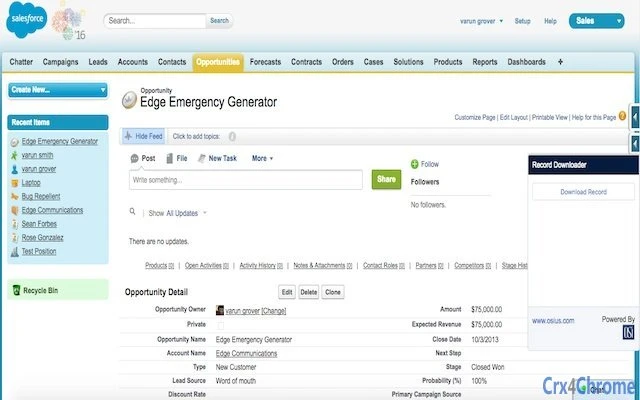
The software features a minimalistic user interface that integrates directly into the Salesforce browser environment. A single button or menu option appears when a record is open, allowing users to initiate the export process with one click. Navigation is intuitive, with no additional menus or settings required for basic functionality.
The workflow is streamlined: open a record, click the export button, and the file is saved locally. No configuration is needed, making it accessible even to non-technical users. Performance is optimized for efficiency, with the export process completing rapidly after initiation.
The developer did not specify resource usage details, but the small file size and browser-based nature suggest low CPU and RAM consumption. Stability appears consistent, as the tool operates within the browser’s secure sandbox. No known issues with crashes or freezes were reported, though user experiences may vary based on individual browser and network conditions.
Compatibility & System Requirements
The software is compatible with both Windows and Mac operating systems, supporting modern web browsers used with Salesforce. It functions as a browser extension, meaning it relies on the browser’s capabilities rather than native system components. The installation size is 2.4 MB, indicating a lightweight footprint.
Exact system requirements were not listed, but the tool’s design suggests it runs on standard configurations used for Salesforce access. Platform compatibility information is limited to the operating systems provided. Users should ensure their browser is up to date and supports extensions to ensure proper functionality.
The tool does not require administrative privileges for installation, enhancing accessibility across different user environments.
Pros and Cons
Pros
- Fast and simple export of Salesforce records to CSV
- Direct integration with Salesforce browser interface
- Lightweight at only 2.4 MB
- Free to use with no licensing fees
- Designed for quick sharing with external parties
- Future updates planned for list view export
Cons
- No information available on advanced export options
- Only supports single record export in current version
- Compatibility details beyond OS and browser are not specified
- Developer background is not disclosed
- No official support channels listed
FAQ Section
Is this tool compatible with all Salesforce environments?
The software is designed for standard Salesforce domains and should work with most standard configurations. Compatibility may vary depending on browser settings or organization-specific security policies.
Is the data exported secure?
The tool operates within the browser and exports data locally. No data is transmitted to external servers unless explicitly configured by the user. Users should follow their organization’s data handling policies when sharing exported files.
Does it require a paid Salesforce license?
No, the tool functions with any Salesforce account that allows access to records and standard browser-based operations. It does not require additional licensing.
Can I use this tool offline?
The tool requires an active Salesforce session and internet connection to access records. It cannot function when offline.
How often are updates released?
Updates are planned based on user feedback and feature development. The upcoming addition of list view export indicates ongoing improvements. Users should check for updates via their browser’s extension manager.
Final Thoughts + CTA
This lightweight, free tool offers a practical solution for users needing to export Salesforce records quickly and securely. Its focus on speed, simplicity, and direct integration makes it a valuable addition to any Salesforce workflow. While currently limited to single-record exports, the planned expansion to list views signals a commitment to growth.
Professionals in sales, project management, and data coordination will benefit most from its efficiency. For those seeking a no-frills, secure way to export Salesforce data as CSV, this tool delivers on its core promise. Download Fast Salesforce Data Export Tool now.







